
Hard Drives By StoreIN

by StoreIN
Price:  600
600
 2999
2999
600
2999
You Save: -80%
by StoreIN
Price: 495
1499
495
1499
You Save: -67%

by StoreIN
StoreIN ADNET 2.5 USB 2.0 HDD Screwless Laptop and Desktop Casing Hard Disk Encloser (Size 2.5 inch)
Price: 345
1499
345
1499
You Save: -77%

by StoreIN
Price: 300
1499
300
1499
You Save: -80%
StoreIN Hard Drive Transfer Cable for Xbox 360 Slim HDD Data Cable Cord Kit for Xbox 360 S Controller Hard Disk Cable - Product Features
- Back-up your Xbox 360 hard disk drive data to your personal computer (PC) with the data transfer cable via any USB cable
- Easily transfer all your data - just connect the USB cable to the USB port of your Xbox 360 hard drive disk and connect to any USB port on your personal computer
- Use the software tool kit (included) and you will be able to access and edit the files on the Xbox 360 hard drive
- One Month Manufactured Warranty
- Easy to use
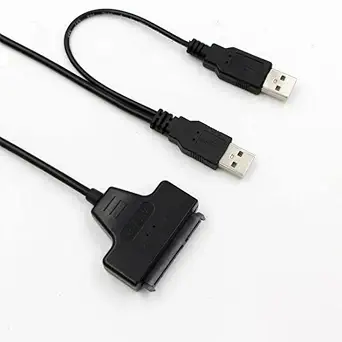
StoreIN USB 2.0-2.5" 22pin Sata to USB Hard Drive HDD or SSD (Solid State Drive) Adapter Laptop Converter Cable (Works only for 2.5 inch HDD or SSD Hard Disk Drive) - Product Features
- Usb to sata
StoreIN ADNET 2.5 USB 2.0 HDD Screwless Laptop and Desktop Casing Hard Disk Encloser (Size 2.5 inch) - Product Features
- This digital file storage device is compatible with the operating systems like Windows 98SE, 2000, ME, XP, VISTA, Windows 7.
- To make the file transferring task in this casing hard disk easier, designers have provided a screwdriver, one USB cable with this casing hard disk.
- The user needs to add one side of the cord in the USB port of the hard drive, and the other part with the computer, smart phone or tablet from where the user wants to transfer his digital files.
- More stable power supply from dc adapter - plug and play and hot-swap.
- USB 2.0 external interface, compatible with USB 1.1, USB 2.0 super speed 480mbps.
StoreIN Second 2nd HDD Caddy 12.7mm 2.5" SATA 3.0 SSD Case Hard Drive Enclosure Adapter + LED for Laptop CD-ROM DVD ROM Optibay - Product Features
- Brand New and smart design;
- The thickness of the adapter is 12.7mm;
- Internal Interface: 7+6 13Pin SATA (for 2.5\" HDD/SSD or ssd drive); External Interface: 7+15 22Pin SATA (for Laptop's Motherboard);
- The 2nd Hard Disk Drive Caddy can bring you new maximum data storage flexibility.
- With the second HDD in your Laptop, you can speed to backup important applications and critical data ( Simply remove your CD-ROM drive and put the Caddy with the added hard drive in its place.)
Popular Categories on BuyBestBrands.in
Garden & Outdoors : Seeds, Plants, Plant Containers, Gardening Tools, Garden Decor, Pest Control, Barbecue & Outdoor Dining, Solar Power, Fertilizer & soil, Watering Equipment
Amazon Brand : Symbol, Inkast Denim Co, House & Shields, Jam & Honey, Solimo, Presto!, Symactive, Eden & Ivy, Vedaka, Tavasya, Myx


