
SPY Cameras By m mhb

by m mhb
Price:  2999
2999
 4999
4999
2999
4999
You Save: 2,000.00 (40%)

by m mhb
Price: 1999
2999
1999
2999
You Save: 1,000.00 (33%)
by m mhb
Price: 1498
2999
1498
2999
You Save: 1,501.00 (50%)

by m mhb
Price: 998
1999
998
1999
You Save: 1,001.00 (50%)
m mhb Spy Camera Spectacles Hidden Camera in Specs Mini Portable Hidden Secret Lens in Wearable Glasses Spy Security Camera Video and Audio While Recording no Light Flashes. 32gb Memory supportable - Product Features
- Spy Camera Spectacles - A must for trend-spotter, journalist, traffic police, travellers, hikers, mount climbers, students, life-lovers and etc
- This spy camera system comes in a cool spectacle form that can be slipped on as normal for investigative purposes. The camera is able to capture videos, which can be transferred to any Windows-powered Brilliant and rich natural colours, 720p high quality video images
- Flexible design suits for different faces for different races and ages. Fashion and cool design keep up closely with vogue steps. A perfect embrace of fashion concepts and factors. 5 mega pixels CMOS camera for clear digital video recording
- Step 1.-Long press the button first blue light then turn into red light (device on) . Step 2.-Press the same button for 4 second red light flashes three times then switch off (recording start) . Step 3.-Long press the button one second red light switch on again (recording save) . Step 4.-Long press the button blue light blinks and switch off ( device off)
- Charging time: about 60-70 Minutes. Recording time: upto 45minutes. Package Includes: 1 x Specs Camera + 1 x Usb Cable
M MHB HD Spy Button Camera Hidden Video & Audio Recording Button Shirt Button Concealed Camera with Inbuilt 16gb Memory. - Product Features
- Please use as per the instruction: START VIDEO AUDIO RECORDING: 1. Press on / off button for 3 sec and then leave (light mode: orange light will on and then turn in to blue that means recording has started.
- 2. To switch off the button camera hold the same on / off button for 3 second until the orange light Flashes and get switch off.
- DATA TRANSFER. 1. Kindly switch of the button camera & than attached in the computer. 2. While functioning please dont attached in to computer .
- Battery charging time.1. Please switch off the Button Camera first and then keep for charging 2. Please dont charge more than 60min …. 3. While charging yellow light Flashes continuously and when it stop Flashing that means charging complete 4. If the charging cross 60min and yellow light dont stop remove the Button camera from the charging.
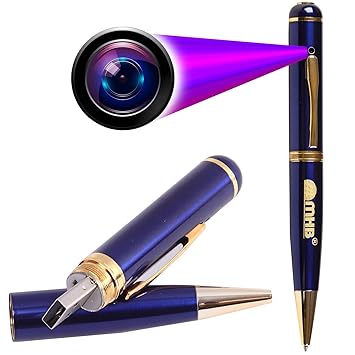
Spy Camera m mhb HD Spy Pen Camera Video/ Audio Hidden Recording,HD Sound Clearity Pen Wired Camera Updated Model Series-1 with Built in Memory. Everything is Updated and Best Performance - Product Features
- Kindly switch of the pen camera and than attached in the computer,2. While functioning please don't attached in to computer or electricity
- Please use as per the instruction: START VIDEO AUDIO RECORDING :
- Press on / off button for 3 sec and then leave (light mode: orange light will on and then turn in to blue that means recording has started.
- To switch off the pen hold the same on / off button for 3 sec until the orange lights comes and get switch off.
- While recording if the battery gets drains no need to worry your data will be automatically saved in the pen and then it will get switch off.
Spy Camera M MHB HD Keychain Camera Series 9, & Hidden Spy Video Recorder, Features Video, and Photo, Smart Keychain Spy Camera Hidden Audio /Video Recording Support 32GB Memory - Product Features
- kindly charge the product laptop or desktop for 45-60 min. DONT CHARGE MORE THEN THAT.IF LIGHT DONT STOP FLASHING AFTER 60-90 MIN THAN ALSO REMOVE FROM CHARGE Prefer laptop or desktop mostly. you can use electricity mode in emergency. insert memory card in it before using (format memory card before using in device
- START VIDEO AUDIO RECORDING ; Big button Kindly press on / off BUTTON till the time orange light get on .Then small button Kindly press on / off BUTTON till the time orange light get on flash 3 times AND GET OFF that means recording has started .
- Stop Recording : Press SMALL BUTTON 1 time and Quikly leave orange light will get on . Power off : Big Button Hold on / off button for 3 sec orange light will get of
- then use usb cable and attached laptop or desktop.IF YOU ARE UNABLE TO SEE THE VIDEO AND ONLY AUDIO SOUND IS COMING SO PLEASE KINDLY DOWNLOAD THE VLC MEDIA PLAYER TO PLAY THE FILE.IF LIGHT DO NOT GET ON/OFF,
- KINDLY RESET THAT PRODUCT BY A NEEDLE OR A PIN.YOU WILL GET THE RESET BUTTON BETWEEN THE USB CABLE SLOT AND THE MEMORY CARD SLOT
Popular Categories on BuyBestBrands.in
Garden & Outdoors : Seeds, Plants, Plant Containers, Gardening Tools, Garden Decor, Pest Control, Barbecue & Outdoor Dining, Solar Power, Fertilizer & soil, Watering Equipment
Amazon Brand : Symbol, Inkast Denim Co, House & Shields, Jam & Honey, Solimo, Presto!, Symactive, Eden & Ivy, Vedaka, Tavasya, Myx


