
Motherboard By MACHINIST
 19198
19198 30964
30964
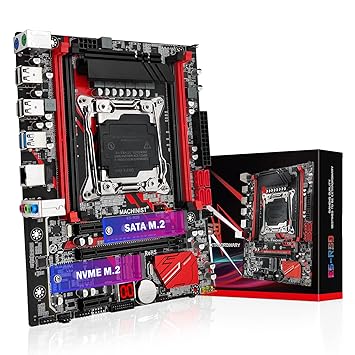
MACHINIST X99 LGA 2011-V3 Motherboard, Micro ATX Motherboard (PCIe 3.0, M.2 Slots, 4 Channel DDR4, SATA 6Gb/s) for Intel XEON E5 V3/V4, Core i7 seriers CPUs, PC Server Mainboard with Diagnostic Card - Product Features
- LGA 2011-3 socket: The X99 motherboard support 5th/6th gen Intel Core i7 processors and XEON E5 V3/V4 series processors with LGA 2011-3 Socket. E.g E5-2650 V3, E5-1650 V4, E5-2698 V4, i7-6900K, i7-5930K, etc. (Not compatible with LGA 2011 sockets, and i7 series processors are not REG ECC compatible.)
- Dual M.2 interface: Supports two different hard drive types: NVME M.2 and SATA M.2. Supports PCIe 3.0x4 protocol, the maximum transmission speed can reach 2000-3000MB/s
- 4 Channel DDR4 memory slots: This gaming motherboard has 4 DDR4 memory slots. Supports normal memory and ECC server memory. Memory capacity up to 128GB ,Memory type: DDR4 2400/2133 MHz.specialied in large-scale games easy to deal with large-scale film and television modeling and rendering. (Note: Server memory and desktop memory cannot be used together.)
- 3 PCIe expansion slots: Including 1 PCIe 3.0 X16 slot and 2 PCIe 2.0 X1 slots. The transmission rate of each channel is 8Gbps, and the rate of X16 slot can reach 128Gbps. The X1 slot can also be used to expand the network card, sound card and hard disk
- Multiple expansion slots: The expansion slot includes 1 PCI-E X16 graphics card slot, 2 PCI-E X1 slot, 4 USB 2.0 slots, 2 USB 3.0 slots, 4 SATA 3.0 slots, 2 PS/2 slots, 1 NVME M.2 interface and 1 SATA M.2 interface
- The package includes: 1*CPU fan bracket, 1*SATA cable, 1*I/O baffle, 1*motherboard. All the information of this product can be found in the description and pictures. Manuals are not included in the package and can be downloaded from this page if needed. The CR2032 battery on the motherboard has been removed. It is not included in the package. Please purchase it yourself
- Tip: Before purchasing this server board, make sure you can install it yourself. Of course, they are easy to install. After the motherboard is installed normally, if there is no display, no boot, no picture, no network card, no sound card, etc. It is recommended that customers restore factory settings, reset CMOS, or use an eraser to erase the metal pins on the memory, CPU, or graphics card
- Common problem: \"FF\" code appears on the diagnostic card, which may be caused by incompatible CPU, foreign objects on CPU pins or improper power connection. The metal fingers of the CPU can be wiped with an eraser to ensure cleanliness. If the codes \"b7\", \"b9\", \"53\" and \"b0\" appear, this is a problem that the motherboard does not detect the memory. You can remove and insert the memory several times or wipe the metal fingers of the memory with an eraser to solve it
- Note: If you need the desktop motherboard to enter the BIOS, please press the \"Del\" key continuously after pressing the startup key. Please do not wait until the startup LOGO screen appears on the computer screen before operating, because it is already too late. If you don't know where to download the driver, it is recommended to use the win 10 system
MACHINIST X99 Computer Motherboards, LGA 2011-V3 (Intel Core i7 5th/6th Gen) ATX Server Motherboard with VRM Fan (PCIe 3.0, Dual M.2, SATA 6Gb/s, DDR4, Gigabit Ethernet) for Intel XEON E5 V3/V4 series - Product Features
- Intel LGA 2011-3 socket: The Intel xeon motherboard supports Intel Core i7 5th/6th generation processors and XEON E5 V3/V4 series processors. (Eg. Core i7-5960X, Core i7-6850K, Xeon E5-2650 V3, Xeon E5-2690 v4)
- 4 channels DDR4: The X99 gaming motherboard has 4 DDR4 memory slots, designed by 4 channels, compatible with ECC and non-ECC memory. The supported effective frequencies are 2133/2400MHz, and the maximum capacity is 128GB
- Dual M.2 slots: This ATX motherboards are equipped with NVME M.2 and SATA M.2 slots. The NVME M.2 slot adopts PEIe channel, and the maximum transmission speed is 32Gb/s
- 5 PCIe graphics card slots: Equipped with 3 PCIe X16 slots (two of which are protected by a steel case), 1 PCIe X4 slot and 1 PCIe X1 slot. Using the PCIe 3.0 protocol, the effective transfer rate can reach up to 15.754 GB/s
- More functions: Assembled with aluminum alloy VRM cooling fan, one-key \"boot\" and \"restart\" buttons, buzzer and diagnostic card, etc. Including 3*USB 3.0(1*front), 7*USB 2.0(1*front), 2*PS/2, 4*SATA 3.0, 2*SATA 2.0. Size: 215mm x 303mm
- Tips: The package includes: 1*CPU fan bracket, 1*SATA cable, 1*I/O baffle, 1*motherboard, 1*DC-Fan. All the information of this product can be found in the description and pictures. The package does not include the user manual, you can download the user manual file on the product description page. If you don't know where to download the driver, it is recommended to use the win 10 system, which can help you solve all driver problems
- Tips: Before purchasing this ddr4 motherboard, make sure you can install it yourself. After the motherboard is installed normally, if there is no display, no boot, no picture, no network card, no sound card, etc. It is recommended that customers restore factory settings, reset CMOS, or use an eraser to erase the metal pins on the memory, CPU, or graphics card
- Common problem: \"FF\" code appears on the diagnostic card, which may be caused by incompatible CPU, foreign objects on CPU pins or improper power connection. The metal fingers of the CPU can be wiped with an eraser to ensure cleanliness. If the codes \"b7\", \"b9\", \"53\" and \"b0\" appear, this is a problem that the motherboard does not detect the memory. You can remove and insert the memory several times or wipe the metal fingers of the memory with an eraser to solve it
- Note: If you need the motherboard to enter the BIOS, please press the \"Del\" key continuously after pressing the startup key. Please do not wait until the startup LOGO screen appears on the computer screen before operating, because it is already too late
Popular Categories on BuyBestBrands.in
Garden & Outdoors : Seeds, Plants, Plant Containers, Gardening Tools, Garden Decor, Pest Control, Barbecue & Outdoor Dining, Solar Power, Fertilizer & soil, Watering Equipment
Amazon Brand : Symbol, Inkast Denim Co, House & Shields, Jam & Honey, Solimo, Presto!, Symactive, Eden & Ivy, Vedaka, Tavasya, Myx


